Payment

Overview

The Payment product allows you to create payments (e.g. single payments and periodic payments).
The product is PSD2-compliant.  

Step-by-step on how to use the Payment product

Initial activities

Enrollment and TPP security need to be in place.

For every payment

This flow shows how to initiate and authorize a payment (including Strong Customer Authentication):
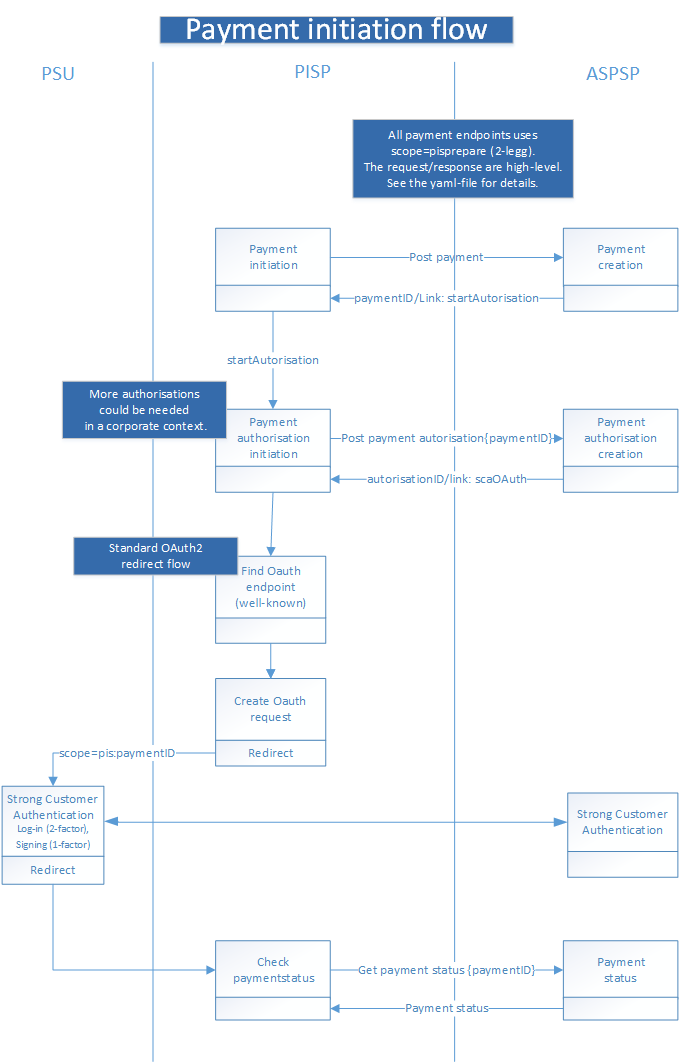
Payment initiation flow

Signing basket (for WebBank Corporate agreements only)

A corporate PaymentServiceUser (PSU) can initiate several payments and sign all payments using a signing basket.

The feature is not available for private PaymentServiceUsers.

Simple step-by-step:

  1. POST a payment and get a paymentID in return.
  2. POST several payments.  Check limitations in the payment yaml-file.
  3. Create a signing basket using all the paymentIDs and use the flow shown above.
  4. Let a corporate PSU sign the content of the signing basket.

If the payments require signing by more than 1 PSU, you can create a new signing basket with paymentIDs needing further signing.

Additional authentications of payments can also be handled by PSUs in the WebBank Corporate using the payment overview.

Payment API changes effective after 13 November 2026

After 13 November 2026 the SEPA and cross-border payment products move to a new v2 payment API. The remaining payment products stay on the current v1 API.

Availability: The v2 endpoints are currently available in sandbox only so you can build and test your integration. The production v2 endpoints will become available at a later date. Until then, production continues to serve all products on v1.

Our sandbox already reflects the new reality after November 13, so you can test the v2 endpoints today and make sure your integration is ready before the change takes effect in production.

Moving to v2

Payment productBeforeAfter13 November 2026
sepa-credit-transfersv1v2
cross-border-credit-transfersv1v2
domestic-credit-transfersv1v1 (unchanged)
instant-domestic-credit-transfersv1v1 (unchanged)
intraday-domestic-credit-transfersv1v1 (unchanged)
periodic-payments/domestic-credit-transfersv1v1 (unchanged)
signing-basketsv1v1 (unchanged)

What you need to do

  • If you use SEPA or cross-border credit transfers: migrate those calls to the v2 base path (/openbanking-payment/v2/...). Test against sandbox now.
  • If you use any other payment product: no change — keep using the v1 base path (/openbanking-payment/v1/...).
API versionPathProducts
v2/openbanking-payment/v2/payments/{payment-product}sepa-credit-transfers, cross-border-credit-transfers
v1/openbanking-payment/v1/payments/{payment-product}all other credit-transfer products, periodic payments, signing baskets

The v1 and v2 APIs follow different versions of the Berlin Group NextGenPSD2 / openFinance standard, so the request and response payloads are not identical:

  • v1 follows the Berlin Group standard version 1.3.
  • v2 follows the openFinance API Framework XS2A (Berlin Group) version 2.3.

The high-level authorization (SCA) flow is the same across versions, but you should review the v2 message schemas and update your payloads when migrating the two products.

Both specifications are published at the bottom of this page (see the linked YAML/OpenAPI files for each version).

Try it out

You can try the Payment API against the sandbox using Postman.

The sandbox uses static mockdata for all endpoints.

The various IDs (e.g. paymentID) that are available in the Postman collections. We recommend reading through the collection and it's documentation.

Prerequisites

You will have received the following when you signed up for sandbox access:

  • client id,
  • an API key
  • a test client certificate

The sandbox follows the PSD2 security flow described at: Security

Using the collections

  1. Import the collection and the sandbox environment into Postman, and select the environment.
  2. In the environment, fill in clientId and x-api-key with the values from your sign-up.
  3. In Postman, go to Settings → Certificates and add your test client certificate (with its password) for both mTLS hosts: sandbox-cert-api.sydbank.dk (resource server) and sandbox-cert-auth.sydbank.dk (token server). This is required for the mutually-authenticated (mTLS) connections.

Detailed documentation

The Payment API is described by two OpenAPI specifications. Which one you use depends on the payment product (see the product table above).

SpecificationStandardBase pathProducts / services covered
Payment API v2 — download OpenAPIBerlin Group openFinance API Framework XS2A 2.3/openbanking-payment/v2/...sepa-credit-transfers and cross-border-credit-transfers.
Payment API v1 — download OpenAPIBerlin Group 1.3/openbanking-payment/v1/...domestic-credit-transfers, instant-domestic-credit-transfers, intraday-domestic-credit-transfers, periodic-payments/domestic-credit-transfers, and signing-baskets.