A Third Party Payment Service Provider (TPP) integrating with the PSD2 APIs provided by Bankdata must implement several flows to authenticate itself and perform PSD2 operations on behalf of a Payment Service User (PSU), as described in the Berlin Group Specification.
Initially, the TPP will need to register an account with Bankdata and provide the eIDAS certificate issued to the TPP. Additionally, the TPP must register one or more valid Redirect URLs used in flows where the PSU is involved. When the TPP accesses production data, using a localhost URL or an IP address as a redirect URL is not allowed.
Once registered, the TPP will receive a confidential API key (unique per TPP and application) that must be provided when calling the PSD2 API endpoints. The eIDAS certificate contains the client's distinguished name. Bankdata will use the distinguished name as the unique identifier for the TPP. The eIDAS certificate also lists the PSD2 scopes the TPP is authorized to use, i.e., account information and payments. Finally, the certificate and the private key will be used to establish a mutual TLS connection, effectively guaranteeing the authenticity of the TPP client when it connects to the API endpoints.
The next required step for the TPP is to authenticate against the relevant bank-specific authentication endpoint, request one or more scopes, and receive a time-limited access token in return. This access token authorizes the TPP to make subsequent PSD2-specific calls within the granted scopes. In the following, we will refer to this token as a 2-legged token, because of the two parties involved: The TPP and the OAuth service.
This 2-legged access token can be used for multiple PSD2 operations, even related to different PSUs. No refresh token is issued, but it is always possible to obtain a new access token using the mutual TLS channel as a means of authentication.
When the TPP makes requests on behalf of a specific PSU, multiple flows may be utilized, depending on the scope of the operaton. In either case, the TPP will first, based on previous interaction with the PSU, initialize the flow by sending the relevant information (e.g. account or payment information) for the transaction/operation to the relevant PSD2 API. In return, the TPP will receive an ID that may be used to initiate the authorization that the PSU must make for the operation to be carried out.
This authorization happens through redirection of the PSU's user agent (browser) in accordance with the OAuth2 standard, so that the PSU (transparently to the TPP) performs the authorization directly against the PSD2 service, possibly using an external authentication provider. Once completed, control is handed back to the TPP (again, using redirection to one of the TPP's pre-registered redirect URLs). If successfully authorized by the PSU, the redirect will provide an authorization code that the TPP can use to obtain an access token, which in turn is needed to perform the specific PSD2 operation that the PSU has approved (in particular account information requests). We will refer to this token as a 3-legged token because of the three parties involved: The TPP, the PSU, and the OAuth service.
For account information, this can consist of multiple account enquiries over time. The 3-legged access token will have a limited lifespan, but a refresh token will also be provided, making it possible for the TPP to obtain a new access token when needed. For payments, the access token is tied to the specific payment (a new PSU authorization flow is always required for each new payment). Note that for payment, the 2-legged access token should still be used for querying status on the payment.
eIDAS and mutual TLS
In accordance with the Berlin Group Specification, our APIs are available to TPPs that have registered an account by providing a valid eIDAS certificate. All communication (except for requests against certain open endpoints) is required to run securely over a mutual TLS connection using the registered certificate. This ensures the secrecy and integrity of transmitted data as well as the authenticity of the TPP client connecting to the APIs.
Change to mTLS Endpoint Domains
As part of ongoing security enhancements, all mutual TLS-secured endpoints have been migrated to dedicated subdomains: https://cert-api.{bank}.dk and https://cert-auth.{bank}.dk. These new domains exclusively serve endpoints requiring client certificate authentication.
As part of this change, the OIDC discovery documents(oidc .well-known) has been updated. The mtls_endpoint_aliases section in the metadata explicitly list the www.cert-* endpoints for all mTLS-related operations, such as
Standard TLS endpoints will continue to reside on their existing subdomains, such as:
https://auth.{bank}.dk/oauth-authorize
⚠️Existing mTLS endpoints (e.g., api.{bank}.dk) has been shut down on 18-10-2025. All TPPs must update their configurations to use the new https://cert-* endpoints to avoid service disruption.
Please note that Bankdata will uniquely identify a TPP by the client ID found in the OID 2.5.4.97 field in the ClientDN subject in the certificate. For an eIDAS certificate, it will begin with "PSD" followed by the country code, etc. In the code examples below, this unique ID will be denoted yourClientId.
The way you set up a client application to run with mutual TLS connections (including the format of the certificate and private keys, etc.) is highly dependent on your implementation framework and can be tricky. However, you can initially probe whether the connected infrastructure allows you to reach the desired authentication endpoint by manually sending a request over mutual TLS using the curl tool as follows:
Note that the -E and --key flags specify certificate and key files in PEM format. You may extract these from a PFX file containing your eIDAS certificate using OpenSSL or other tools. If the private key is encrypted, you will further need to add --pass <private_key_passphrase> to the curl command.
then your certificate is correct and has been registered correctly, and you are able to obtain the 2-legged access token.
If instead you receive a reply in the form:
{"error":"invalid_client","error_description":"No certificate presented for …"}
you did reach the endpoint, but the certificate or client ID somehow doesn't match the registered ones.
If you receive any other kind of error, the problem is likely to be somewhere in the infrastructure, typically a proxy or firewall issue. You can add the -v option to curl to get more details on the attempted connection, check proxy logs, or use other tools to debug network traffic.
If the curl command succeeds, but the application you are developing fails to connect, you should check that the certificate and key formats are as expected by the framework you use, and that the request headers and payload match those of the curl command above.
If your application is written in Java, it is also possible to set up TLS debugging by specifying -Djavax.net.debug=all. With TLS debug enabled, it is possible to see all steps in the TLS handshake, e.g., whether the handshake is mutual TLS or normal TLS where only the server presents its certificate.
Two-legged Authorization (Client-Server)
As described above, setting up a mutual TLS connection is a prerequisite for authenticating and obtaining a 2-legged access token, which is issued using the OAuth2 Client Credentials Grant Flow. Note that the Client Credentials flow based on the eIDAS certificate asserts that the confidential client application can be trusted to keep the private key secret, i.e., that it runs on the TPP's secure servers and not, for example, on a mobile app or as part of a web page.
The issued token authorizes the TPP to make further requests against the PSD2 APIs. Obtaining the 2-legged token can be considered a pre-flow that is required for any PSD2 operation but needs only be carried out if a valid token (containing the correct scopes) has not yet been obtained, or if the obtained token has expired. Therefore, for efficiency, the TPP is encouraged to cache and reuse the obtained 2-legged access token for multiple calls. Bear in mind, though, that any token is only valid for accessing the bank for which it was issued.
Client Credentials Grant flow
To obtain a 2-legged access token, the TPP must call the token endpoint for the relevant bank. To get the URL for the token endpoint, the TPP should send a GET request to the .well-known OpenID discovery document from the bank-specific OAuth2 issuer at
e.g., https://auth.sydbank.dk/oidc/.well-known/openid-configuration. Note that OAuth2Issuer is constructed as OAuth2AuthorizationServer/oidc, where the full list of OAuth2 Authorization Servers can be found here. The JSON-formatted reply contains the relevant URLs to call for obtaining access tokens in the various PSD2 flows. Specifically, the field token_endpoint will contain the URL you need to call to obtain the 2-legged access token, e.g.,
After obtaining the URL for the token endpoint, the TPP must POST the following payload/body to the token endpoint:
grant_type=client_credentials
client_id={yourClientId}
scope={requested scopes}
The possible requested scopes are:
aisprepare: For use as AISP role.
pisprepare: For use as PISP role.
If you need multiple scopes, you can supply them space-separated in the POST request. If you supply the HTTP entity-body manually in application/x-www-form-urlencoded format, the full list of scopes should be scope=aisprepare+pisprepare as + is the encoded value for a space. If, on the other hand, you use a specific client-credentials flow framework, you can probably set the scope value directly along these lines:
Note that any requests for a scope that the TPP has not been authorized to use, i.e., any scope not listed in the eIDAS certificate, will not be honored. The issued 2-legged token will contain only scopes that are both requested and allowed.
Note that the mutual TLS connection itself establishes the authenticity of the TPP, so no Authorization header (as exemplified in section 4.4.2) should be added to the request.
As described in the section about mutual TLS above, you'll either receive a JSON response where the access_token field holds your 2-legged access token, or a JSON response containing "error":"invalid_client" if you could not be authenticated as a pre-registered TPP.
In pseudo-code, the client credentials grant flow as seen from the TPP looks like this:
    // Obtain token endpoint from OAuth configuration
    var issuer = $"{OAuth_2_Authorization_Server}/oidc";     // As specified on the 'API Calls' page:
    var wellknown_json = HTTPClient.Get($"{issuer}/.well-known/openid-configuration");
    var token_endpoint_url = wellknown_json["mtls_endpoint_aliases"]["token_endpoint"];

    // Set up parameters
    var scope = "aisprepare pisprepare";     // In this example the returned access token can be used for calling, e.g. initConsent and initPayment
    var url_encoded_content = new FormUrlEncodedContent(new[]{
         new KeyValuePair("grant_type", "client_credentials"),
         new KeyValuePair("client_id", {yourClientId}),
         new KeyValuePair("scope", scope)
    });

    var headers = new HTTPHeaders(new[]{ KeyValuePair("cache-control", "no-cache")});

    var client = new HttpsClientConfiguredWithMutualTLS();    //...using your eIDAS certificate and private key:

    // Request the token and handle the response
    var token_response = client.Post(token_endpoint_url, url_encoded_content, headers);
    if (!token_response.IsSuccessStatusCode) {
         // error handling
    }

    var client_credentials_access_token = token_response["access_token"];     // The obtained 2-legged token should be cached for reuse until it expires
Regardless of whether the TPP needs to set up a PSD2 payment or a PSD2 consent, the initial flow is similar. Provided that a valid 2-legged access token with the relevant scope has been obtained, the TPP will start the flow by calling the initiation endpoint on either the payment or the consent product API using mutual TLS and the 2-legged access token as authorization.
Furthermore, on all calls to any of the product APIs, the secret API key that was issued during TPP registration must be added in an x-api-key header (as well as X-Request-ID and any other requirements listed in the Berlin Group Specification).
After calling the initiation endpoint, the TPP will receive a JSON response with a consentId, a paymentId and several links, including the API endpoint for initiating an actual authorization, stored in the JSON reply in _link - startAuthorisation (the relevant consentId/paymentId will be an integral part of this path).
The TPP can now initiate an authorization (that will involve Strong Customer Authentication by the PSU) by calling the supplied startAuthorization endpoint path on the consent or payment product API. The response from the authorization initiation call will include the full URL to the OAuth configuration (stored in the JSON response in _links.scaOAuth) where a .well-known JSON discovery document can be fetched with a simple GET (see two-legged authentication above for details) and the authorization URL can be extracted as Wellknown["authorization_endpoint"].
The first two calls in the flow might seem overly complex, but this design allows for multiple authorizations to be created based on the same consent or payment which could be relevant in certain cases, e.g., when an authorization from several people is needed to authorize a payment from a shared company account.
The TPP is now ready to start the Strong Customer Authentication by redirecting the PSU's user agent (browser) to the extracted authorization endpoint, including various parameters such as state and codeChallenge (details in pseudo-code below).
In a TPP mobile application, Strong Customer Authentication (SCA) must be initiated by opening the OAuth authorization request in a Custom Tab (Android) or SFSafariViewController (iOS).
The redirect must include the 2-legged access token, a scope specified as:
ais:<consentId> for a consent
pis:<paymentId> for a payment
pis:<signingBasketId> for signings baskets
and the TPP's pre-registered redirect URL that will be called when the authorization completes.
Please note that the Berlin Group sets up some requirements for some of the optional choices in the OAuth flow. In version 1.3 of the implementation guide (navigate to 'Archive' and publication date 2018-10-19), chapter 13 describes these requirements (for example, we require S256 rather than plain for the PKCE code challenge, as outlined in the code example below). Here you will also find information on the structure of code_challenge and code_verifier.
Assuming that a consentId has been fetched already, an authorization has then been initiated, and wellknown_json has been fetched from the URL returned in _links.scaOAuth in the response, the OAuth flow as seen from a TPP's perspective can be expressed as follows in pseudo-code:
   // The authorization endpoint is not mTLS-protected.
   // The authorization endpoint is part of wellknown:
    var auth_endpoint = wellknown_json["authorization_endpoint"];

    // OAuth Parameters
    var request_state = getRandomString(32);     // Use this to prevent XSRF attacks (check against state value in response)
    var scope = $"ais:{consentId}";     // Example is for a consent flow
    var verifier = getRandomString(44);     // please note, this is also needed when handling the redirected OAuth response
    var code_challenge = base64UrlEncode(getSha256Hash(verifier));    // Ensure no padding in encoded code_challenge('=')

    // Construct the URL to which the PSU must be redirected:
    var authorizationUri = $"{auth_endpoint}?response_type=code&prompt=login&ui_locales=DA &client_id={yourClientId}&scope={scope}&state={request_state}&code_challenge_method=S256&code_challenge={code_challenge}&redirect_uri={yourRedirectUri}&acr={yourChosenAcr}
&return_app_url={yourReturnAppUrl}&return_app_type={android or ios}";

    // Return a 302 to the endusers user-agent with the above authorizationUri
AuthorizationURI parameter descriptions
The value of the acr parameter depends on which PSD2 authorization type is being set up:
1. Private Customer Using MitID (acr=psd2)
Description: Standard authentication flow for private customers, using MitID.
Prerequisites: None specific; applicable for all platforms (desktop or mobile).
2. Private Customer Using Mobile Bank (acr=psd2_mobile)
Description: Mobile-specific flow leveraging the bank's app for private customer authentication.
Prerequisites: Must be initiated from a mobile app with the bank's mobile application installed and enrolled on the same device. The paramenter prompt=login is mandatory in this case.
3. Corporate Customer Using MitID (acr=psd2_erhverv)
Description: Tailored authentication flow for corporate customers using MitID.
Prerequisites: Corporate user identification and potential multiple authorizations for shared accounts.
Depending on the customer type, the TPP must redirect the end user to the correct authorization type via the acr parameter in the OAuth authorization request sent to Bankdata in the authorization code grant flow:
Please note that the values psd2, psd2_mobile, and psd2_erhverv are for the production environment, and that the corresponding values in the sandbox environment are psd2_sandbox and psd2_sandbox_erhverv. It is not possible to use acr=psd2_mobile in the sandbox environment.
The prompt=login parameter, which enforces new login, is mandatory for acr=psd2_mobile and recommended in all other cases.
The return_app_url parameter must not be used when initiating from a desktop application; but is mandatory initiating from a mobile app and enables returning to the TPP App from the Approval App. The value should be an app link in the case of Android and a universal link in the case of iOS. The link must have the same origin as yourRedirectUri..
The return_app_type parameter must not be used when initiating from a desktop application; but is mandatory initiating from a mobile app and specifies whether the app to return to is running on Android or iOS.
The ui_locales language parameter can be set in the authorization request, as specified in the OpenID Connect specification. Built-in texts in the authentication flow will be shown in the requested language, if supported. The supported language codes are DA for Danish and EN for English.
Finishing Authorization Code Grant Flow
What happens next is basically a black box to the TPP. The PSU's user agent will enter a flow directly with the authorization endpoint where the end user will be authenticated and authorize the operation requested by the TPP. After the end user has accepted or rejected the request, you will receive a call to the redirect URL you provided.
If the request was accepted, the request handler can find the authorization code and state in the query parameters. The TPP will then use the authorization code to complete the OAuth authorization code flow and obtain a 3-legged access token. Note that the verifier used to create the code_challenge in the original redirect call is now sent to the token endpoint (protected by mutual TLS):
    var response_state = getQueryString("state");
    if (response_state != request_state) {    // request_state from original auth init request (above)
        // Error handling; The state value should match the state you supplied in the request.
    }

    var auth_code = getQueryString("code");
    var token_endpoint = wellknown_json["mtls_endpoint_aliases"]["token_endpoint"];
    var url_encoded_content = new FormUrlEncodedContent(new[]{
        new KeyValuePair("grant_type", "authorization_code"),
        new KeyValuePair("code", auth_code),
        new KeyValuePair("code_verifier", verifier),         // ... verifier from original auth init request (above)
        new KeyValuePair("client_id", {yourClientId}),
        new KeyValuePair("redirect_uri", {yourRedirectUri})
    });

    var client = new HttpsClientConfiguredWithMutualTLS();     //...using your eIDAS certificate and private key
    var token_response = client.Post(token_endpoint, url_encoded_content);
    var access_token = token_response["access_token"];
    var refresh_token = token_response["refresh_token"];
The response from the token endpoint will include the 3-legged access token that can be used to carry out the PSD2 operation that the PSU authorized, e.g., perform several recurring account information requests. The response may also optionally include a refresh token that can be used to obtain a new 3-legged access token if the old one is about to expire or has expired already.
Enforce new login
If two Payment Service Users are using the same device and you want to enforce a new login for each payment, you can do so by adding an extra parameter when calling the authorization endpoint:
prompt=login
This enforces a login with Strong Customer Authentication every time.
Note that this parameter is mandatory for acr=psd2_mobile and recommended for all other values of the acr parameter.
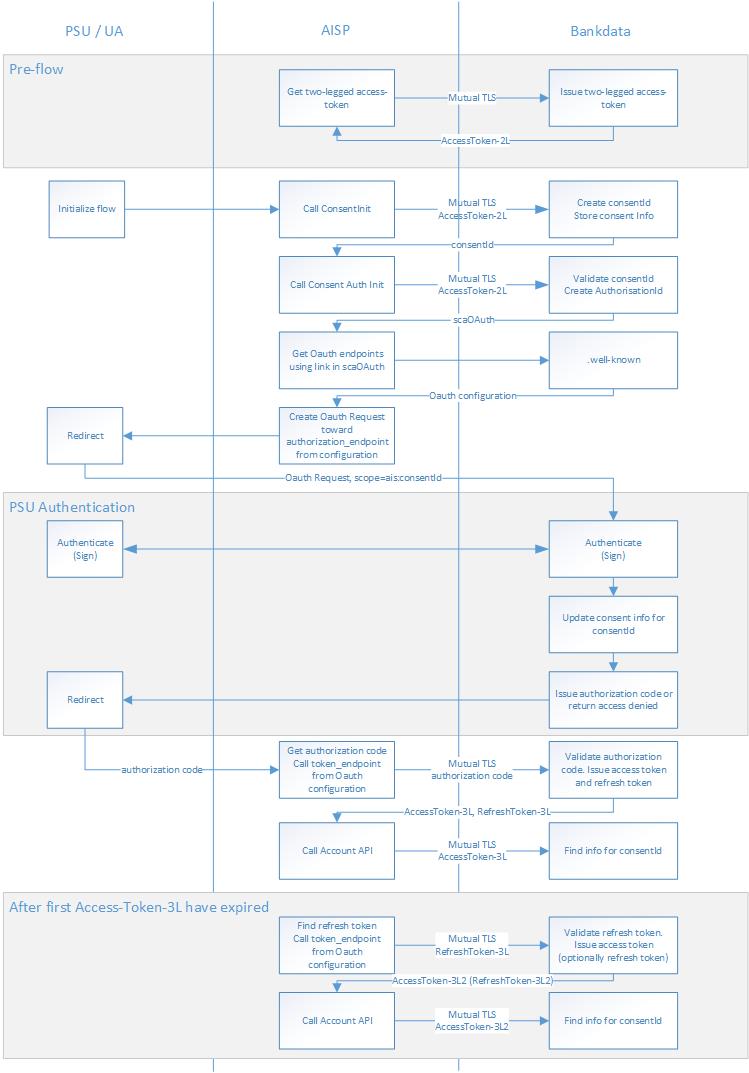
Diagram of a PSD2 flow
The flow diagram below shows a PSD2 account consent flow as described in pseudo-code examples and detailed explanations in the previous sections. The first box, denoted “Pre-flow”, depicts the relatively simple process of obtaining a 2-legged access token, as described under "Two-legged authorization (Client-Server)" above. This flow needs to be repeated only when a valid 2-legged access token for the rest of the flow is not available.
The next part of the flow is used to perform Strong Customer Authentication and authorization by the PSU and obtain a 3-legged access token. The box denoted 'PSU Authentication' in the middle of this flow illustrates the 'black box' part of the flow where the PSU interacts directly with the PSD2 authentication services, transparently to the TPP. At the end of the authentication, control will be returned to the TPP, where the authorization code can be exchanged for a 3-legged access token (protected by mutual TLS).
The TPP can then use the 3-legged access token to call the PSD2-specific product APIs as authorized by the PSU to request information about accounts, transactions, and balances.
Note that consent and payment APIs must be called with the 2-legged access token, and account APIs must be called with a 3-legged access token.
The rule of thumb is that the 2-legged access token must be provided for all requests towards the consent and payment APIs, or whenever the scope is one of the prepare scopes (aisprepare, pisprepare). The 3-legged access token is only used for requests against the account APIs with ais:{consentId} scope.
The very last box in the flow diagram depicts the flow used when the 3-legged access token has expired and the TPP has an associated refresh token.
To receive a new 3-legged access token, set the query parameter grant_type=refresh_token and post the client ID and refresh token to the token endpoint, in accordance with the OAuth refresh token flow. This will give you a new 3-legged access token (and optionally a new refresh token).
App Switching
App switching is supported for the MitID code app and the Bankdata mobile bank app when the authorization flow runs on a mobile device.
During Strong Customer Authentication, the PSU must authenticate using two-factor approval. This can be done using MitID approval app or Mobile bank app.
This section describes how to enable app switching in a TPP mobile application. By app switching, we mean:
Automatically navigating the PSU to an Approval App from a TPP mobile application where the PSU is in the process of logging in.
Automatically navigating the PSU back to the TPP mobile application from an Approval App after the PSU has approved or cancelled the transaction in the Approval App.
Sandbox Approval App
We have developed an Approval App for Android which can be used to test app switching in the sandbox environment. You can either download our APK file or build your own APK file based on our source code. The app is launched when a URL with the custom scheme sandboxstub:// is opened.
This URL is opened when pressing the app switch link in the sandbox environment: